Home

How we run DBT on our CI/CD

by Veivel on January 24, 2026

Background

Data professionals today love dbt. Short for Data Build Tool, it is a tool that simplifies data transformation by using a SQL-first approach rather than making do with code, scripts, or DAGs. This is a shift from a traditionally procedural approach to a declarative approach.

This allows data teams to move faster by enabling data practicioners – not just data engineers, but also data analysts – by turning data transformation from an engineering task to a data modeling task.

Do you know what everyone loves more than dbt, though?

Automation.

In our team, dbt is embedded into our development and deployment process. However, integrating dbt into automated deployment may not be easy due to long build times and environment-specific data errors causing slow feedback loops for the team.

For a fast-paced startup, this is especially a problem. Imagine waiting 80 minutes for your new data model to be built and deployed, only for GitHub Actions to spew out an error from a failed unit test caused by upstream data in production. This was the exact problem our team was facing.

As our data warehouse scaled, our data models increased in quantity while our data size grew in volume. Our CI/CD (Continuous Integration / Continuous Delivery) pipeline went from taking 20 minutes, to 40, to 60, and then before we realized it became 2 hours. I decided to take initiative and fix this.

Existing Design

We had three workflows on GitHub Actions: one for PRs, one for deployment to dev, and one for deployment to prod. Each workflow was simple:

  • PR (pull request): Run linter and CI before merging

  • Dev: Run CI then deliver to dev environment

  • Prod: Run CI then deliver to prod environment

Functionally, this worked, but it had its problems. I listed down the key issues we wanted to solve:

  1. Lack of traceability

    We had two big jobs in each GitHub Actions workflow: the 'dbt build' job and the 'deliver to environment' job. If any single step failed, it was unclear why until we dove into the log noodles.

  2. CI/CD pipeline takes too long

    When the pipeline takes too long, it fails to return feedback to the team in a timely manner. This means fixes and corrections take longer to deliver, and the pipeline for said fixes will also take equally long.

  3. Image for AWS Batch gets updated even if CI/CD returns an error

    We run routine dbt builds daily on AWS Batch through a docker container. If an image with flawed data models gets run in production, it may cause errors, or even worse: data loss.

  4. Many steps are redundant

    In all of our workflows, we rebuild all data models and reran our SQL linter/formatter for all files in CI/CD, which is redundant for files and data models that remain unchanged.

Solution

After the key issues were laid down, I spent two days researching how I should approach this problem, finding references, and looking for alternative solutions outside the CI/CD pipeline – who knows, maybe the problem wasn't the CI/CD but rather the way we did our dbt modeling. I then consulted our Head of Data.

In the end, this is what we had planned:
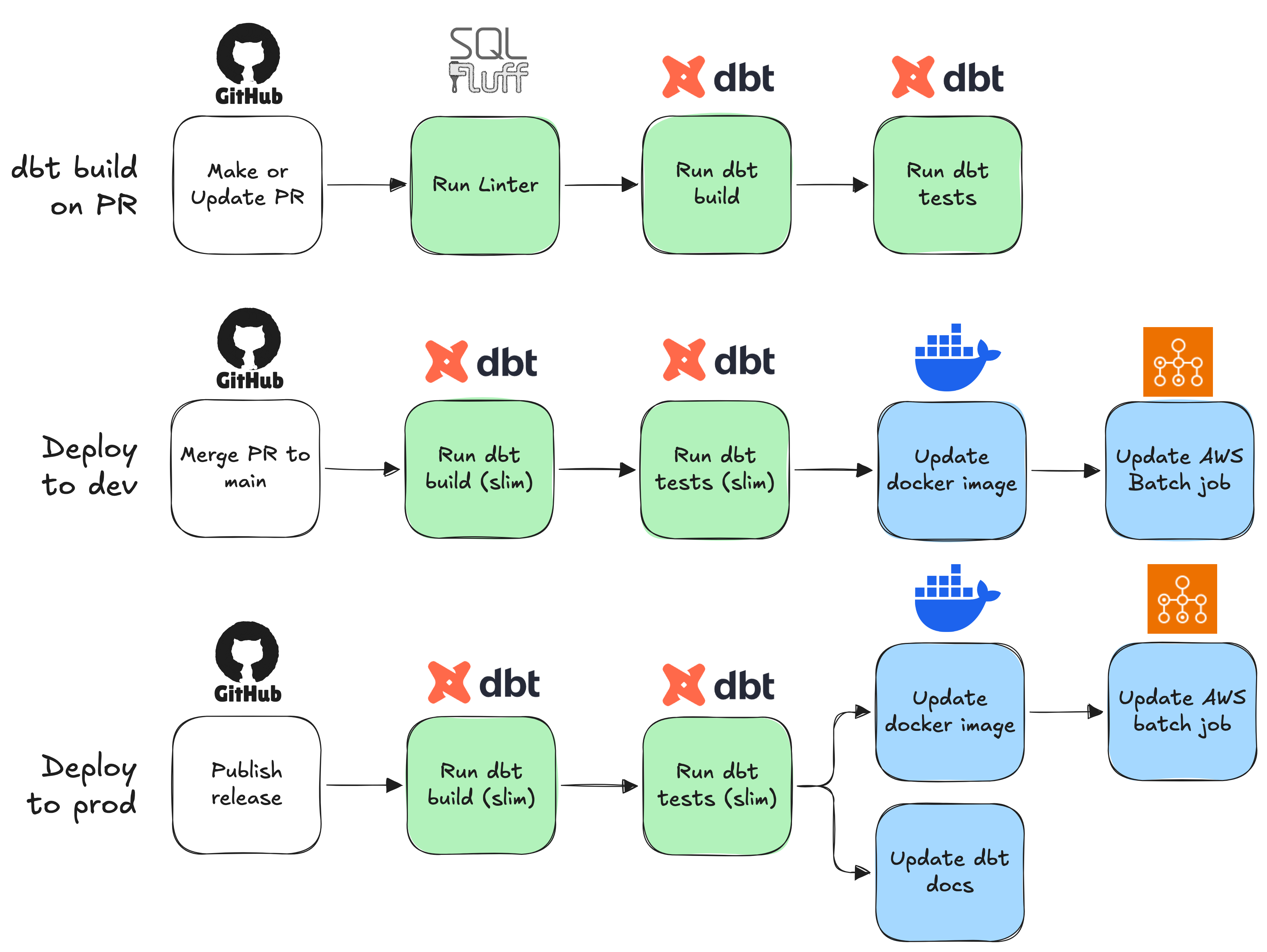
diagram showing 3 ci/cd workflows

The flow didn't change too drastically, as I had built this on top of the existing CI/CD pipeline. What mattered more, however, was the implementation. There were a few changes that I made:

  1. Run linter only in PR; remove sqlfluff linter in dev & prod workflows to as they are redundant steps

  2. Run linter only on SQL files that were added or modified; do not run linter on unchanged files as they are redundant

  3. Separate dbt build and dbt test into two separate jobs in each workflow to increase traceability.

  4. Implement slim CI using a manifest for dbt jobs; i.e. only run dbt on data models that were added or modified (and their upstream / downstream, where relevant) to remove redundant dbt builds.

  5. CD runs after CI, rather than running simultaneously; don't deliver to environment if CI fails, to prevent issues in prod.

Outcome

pr.yaml

Here's what my final PR workflow looked like:

yaml
# .github/workflows/pr.yaml

name: dbt build on PR

on:
  pull_request:
    types:
      - opened
      - reopened
      - synchronize
      - ready_for_review

permissions:
  id-token: write
  contents: read

env:
  DBT_PROFILES_DIR: ./
  DBT_PROJECT_DIR: ./
  DBT_TARGET: pr
  SCHEMA_NAME: "pr_${{ github.event.pull_request.number }}"

jobs:
  dbt-build:
    runs-on: ubuntu-latest
    if: ${{ !github.event.pull_request.draft }}
    steps:
    # setup
    - name: Checkout repository
      uses: actions/checkout@v4
      with:
        fetch-depth: 0
    - name: Install uv
      uses: astral-sh/setup-uv@v5
    - name: Set up Python
      uses: actions/setup-python@v5
      with:
        python-version-file: ".python-version"
    - name: Install dependencies
      run: |
        uv sync 
    - name: Set up AWS credentials
      uses: aws-actions/configure-aws-credentials@v4
      with:
        ...
    - name: Set up dbt
      run: |
        uv run dbt debug && uv run dbt deps
    # finish setup, run CI
    - name: Lint with SQLFluff
      run: |
        git diff --name-only --diff-filter=d origin/main \
          | grep -E "\.sql$" \
          | xargs -r uv run sqlfluff lint --verbose
    - name: Download manifest
      run: |
        aws s3 cp s3://analytics-dev/dbt-manifest/manifest.json manifest.json
    - name: Run dbt build
      run: |
        uv run dbt build \
        --select state:modified+ \
        --defer \
        --state ./ \
        --exclude-resource-type test \
        --exclude-resource-type unit_test
    - name: Run dbt tests
      run: |
        uv run dbt test \
        --select state:modified+ \
        --defer \
        --state ./

The core of the CI/CD is in the last 4 steps, while the others are for setup. So I will only explain these 4 steps.

  1. Lint with SQLFluff
bash
git diff --name-only --diff-filter=d origin/main | grep -E "\.sql$" | xargs -r uv run sqlfluff lint --verbose

This single-line command can be broken down into three parts, separated by the pipe operator. The first command git diff --name-only --diff-filter=d origin/main outputs the names of files which are different between the current commit and the origin/main branch. The --diff-filter=d flag excludes all files that were deleted in the current commit; we cannot lint deleted files.

grep -E "\.sql$" takes the output piped from git diff, and filters only the file names ending in .sql. We don't need to lint yaml or json files. Finally, xargs -r uv run sqlfluff lint --verbose executes uv run sqlfluff lint --verbose, passing each SQL file name as an argument to the command. This then uses sqlfluff lint --verbose through uv run.

By not running sqlfluff lint on EVERY file in the workspace, we've cut down the linting time from over 4 minutes to under 1 (of course, this depends on how many data models there are).

  1. Download manifest
bash
aws s3 cp s3://analytics-dev/dbt-manifest/manifest.json manifest.json

The manifest is an artifact produced by dbt in our previous CI/CD runs. It stores the current state of the dbt project, which allows us to compare states for slim CI (explained later). This command merely downloads that manifest file from our S3 bucket.

  1. Run dbt build
bash
uv run dbt build \
  --select state:modified+ \
  --defer \
  --state ./ \
  --exclude-resource-type test \
  --exclude-resource-type unit_test

This is where it gets fun. We run dbt build to run models, snapshots, and seeds. We exclude tests with --exclude-resource-type test and --exclude-resource-type unit_test. We use dbt build rather than dbt run because run only includes models, while build includes snapshots and seeds as well.

The remaining flags are for slim CI: --defer allows us to sandbox our CI by taking upstream models from an existing environment, rather than re-running everything upstream. --select state:modified+ takes our modified models and everything downstream, ensuring downstream models don't get broken.

  1. Run dbt tests
bash
uv run dbt test \
  --select state:modified+ \
  --defer \
  --state ./ \

This is fairly similar to the previous step, except we only run tests. Once this passes, the whole workflow should show up as a green tick on the PR. We're good to merge now!

prod.yaml

The dev/prod workflows are pretty similar in concept – I'll explain the prod workflow since it's more complete. Here's what my final prod workflow looked like:

yaml
# .github/workflows/prod.yaml

name: Release to Prod
on:
  push:
    tags:
      - '*.*.*'

permissions:
  id-token: write
  contents: read

env:
  DBT_PROFILES_DIR: ./
  DBT_PROJECT_DIR: ./
  DBT_TARGET: prod

jobs:
  
  # build dbt models
  dbt-build:
    runs-on: ubuntu-latest
    steps:
      # setup
      ...
    - name: Download manifest
      run: |
        aws s3 cp s3://analytics-prod/dbt-manifest/manifest.json manifest.json
    - name: Run dbt build
      run: |
        uv run dbt build \
        --select state:modified+ \
        --defer \
        --state ./ \
        --exclude-resource-type test \
        --exclude-resource-type unit_test

  # run tests on dbt
  dbt-test:
    needs:
    - dbt-build
    runs-on: ubuntu-latest
    steps:
      # setup
      ...
    - name: Download manifest
      run: |
        aws s3 cp s3://analytics-prod/dbt-manifest/manifest.json manifest.json
    - name: Run dbt tests
      run: |
        uv run dbt test \
        --select state:modified+ \
        --defer \
        --state ./

  # upload generated artifacts like manifest.json
  upload-artifacts:
    needs:
    - dbt-build
    - dbt-test
    runs-on: ubuntu-latest
    steps:
      # setup
      ...
    - name: Create manifest
      run: |
        uv run dbt compile
    - name: Upload manifest
      run: |
        aws s3 cp target/manifest.json s3://analytics-prod/dbt-manifest/manifest.json
    - name: Publish to data catalog
      run: |
        uv pip install dbt-subdocs
        uv run dbt docs generate --static
        uv run dbt-subdocs --tag docs --directory target --excluded-node-type macros --excluded-node-type sources
        aws s3 cp manifest.json s3://analytics-dbt-docs/manifest.json
        aws s3 cp catalog.json s3://analytics-dbt-docs/catalog.json
        aws s3 cp target/static_index.html s3://analytics-dbt-docs/static_index.html

  # build & push docker image
  build-image:
    needs:
    - dbt-build
    - dbt-test
    runs-on: ubuntu-latest
    environment: prod
    steps:
      # setup
      ...
    - name: Login to Amazon ECR
      id: login-ecr
      uses: aws-actions/amazon-ecr-login@v2
    - name: Build, tag, and push docker image to Amazon ECR
      env:
        REGISTRY: ${{ steps.login-ecr.outputs.registry }}
        REPOSITORY: my_dbt
        IMAGE_TAG: ${{ github.ref_name }}
      run: |
        docker build -t $REGISTRY/$REPOSITORY:$IMAGE_TAG .
        docker push $REGISTRY/$REPOSITORY:$IMAGE_TAG
  
  # update AWS batch job definition on prod
  batch-prod:
    runs-on: ubuntu-latest
    environment: prod
    needs: build-image
    steps:
    - name: Git clone the repository
      uses: actions/checkout@main
    - name: Set up aws credentials
      uses: aws-actions/configure-aws-credentials@v4
      with:
        ...
    - name: Set up Terraform
      uses: hashicorp/setup-terraform@v3
    - name: Initialize Terraform
      working-directory: ./terraform/prod
      run: |
        terraform init
    - name: Apply Terraform
      working-directory: ./terraform/prod
      run: |
        terraform apply -var version_tag=${{ github.ref_name }} -auto-approve

As you can see, the CI here is identical to the CI on PR. The CD jobs, however, are unique to dev/prod.

  1. upload-artifacts: Once CI passes, we upload the newly-updated artifacts to S3. This allows the updated manifest.json to be used as state for the next CI/CD runs, and also allows dbt docs to be re-generated and updated.

  2. build-image: Builds a Docker image representing the current commit and pushes it to AWS ECR.

  3. batch-prod: Updates the AWS Batch job with the tag of the newly-pushed image using Terraform. This updates the workflow for daily dbt builds.

Impact

I monitored the workflows' performance metrics on GitHub Actions. Three months after this project came into effect, we had the following metrics:

  • Average run time across all workflows decreased by 40%, from ~55 minutes down to ~33 minutes.

  • Job failure rate across all workflows decreased from 30% to 18%.

Overall, this initiative was a success in enabling my team to test and deliver their work more efficiently.